Probe targets & service packs
Configure what every agent tests, how often, and which one-click service packs to add. Open Config (Owner/Admin) on the dashboard.
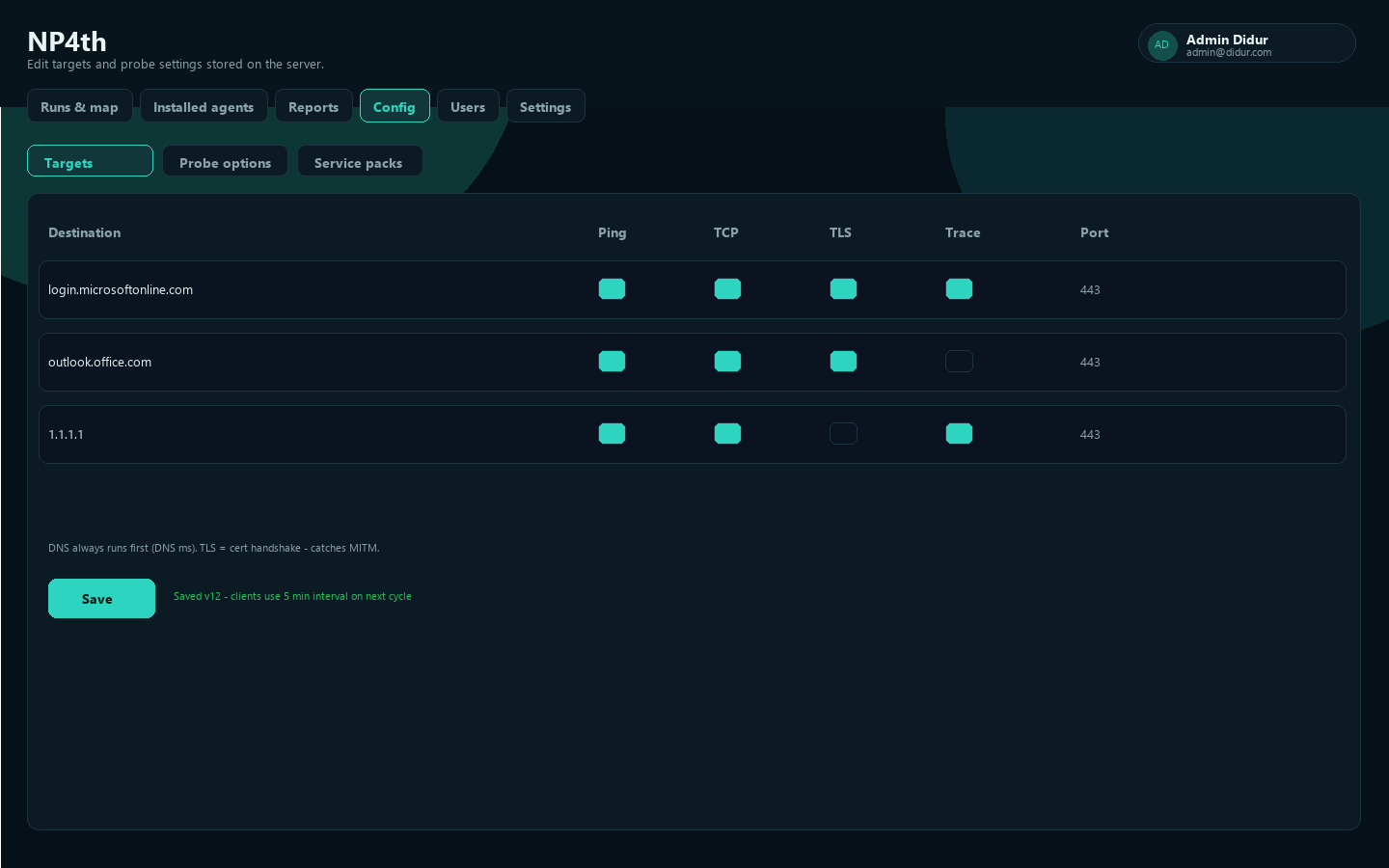
What each check means
DNS always runs first for a target (shown as DNS ms in results). Per-target columns:
| Check | Meaning |
|---|---|
| Ping | ICMP / ping check |
| TCP | TCP connect check to the configured port |
| TLS | TLS handshake + certificate validation (detects MITM) — UI hint: cert handshake catches MITM |
| Trace | Traceroute toward the destination |
| Port | Port used for TCP/TLS |
Toggle columns per destination, then Save. Agents pull the new config on the next Update config or before the next scheduled cycle.
Enable Trace on important destinations when you want hop paths on the Path map. Private hops are skipped for geo plotting.
Probe options
Under Config → Probe options:
| Setting | Default | Range |
|---|---|---|
| Test interval (minutes) | 5 | 1–1440 |
| Ping count | 4 | 1–20 |
| Traceroute max hops | 30 | 1–64 |
| Timeout (ms) | 3000 | 500–30000 |
After save you should see a status like: saved version with the interval agents will use on the next cycle.
Service packs
Service packs add common SaaS / cloud destinations in one click. After applying a pack, review Targets and Save.
Hosts are concrete FQDNs only (wildcards cannot be probed). UDP media (Zoom/Webex/Slack huddles, Teams AV) is not probed — packs use TCP/443 (or documented TCP) web/API canaries.
Included packs:
- Microsoft 365 (Outlook, Teams, Graph, Entra, attachments CDN)
- CrowdStrike Falcon (US-1) — console, API, assets, firehose, cloudsink LFO
- CrowdStrike Falcon (US-2 / gyr-maverick)
- CrowdStrike Falcon (EU-1) — including LFO upload
- AWS Management Console (console, sign-in, static)
- Azure Portal (portal, ARM, Entra, CDN)
- Google Cloud Console (console, APIs, OAuth, accounts)
- Okta (login + CDN; add your tenant host for full coverage)
- Cisco Duo
- Zoom / Cisco Webex / Slack (TCP canaries; UDP not probed)
- Salesforce / ServiceNow / Atlassian (login/API; add tenant instance hosts as needed)
- GitHub (web, API, uploads, raw)
- Box & Dropbox
- Zscaler (gateways + PAC)
- SentinelOne (regional agent hosts)
- Internet baselines (DoH TCP/443 + DNS TCP/53)
Tenant-specific hosts (Okta tenant, ServiceNow instance, Atlassian site, Salesforce My Domain) should be added as custom targets after applying a pack.
Groups
In Config → Groups, create a group and assign agents and tests. New groups start with all tests selected (use Select all / Clear to adjust). Agents receive:
- tests with no group assignment (everyone), plus
- the combined set of tests linked to any group the device belongs to (union across multiple groups)
Ungrouped agents get only ungrouped tests. Admin Config always shows the full list.
Cloud vs endpoint
- Endpoint agents run your targets from user machines (Run on my PC, tray Run test now, Windows tray at login, or macOS launchd).
- Internet check (cloud) runs the same target set from NP4th cloud for a baseline comparison.
Probe failure alerts
After each agent run upload, the API tracks consecutive failures per device + target:
- TLS-enabled targets — counts a failure when the TLS handshake fails.
- TLS-off targets — counts when the overall target result fails.
- Default threshold N = 3 (
ProbeAlerts:ConsecutiveFailureThresholdin API config). One open alert per device+target until a success clears it (or an admin clicks Resolve on the dashboard).
Windows agents also report endpoint security agents (CrowdStrike Falcon, and newer builds: GSA / Netskope / Zscaler / etc.). If Falcon is present and TLS fails to a crowdstrike.com or cloudsink.net host, the alert severity is high with text indicating the sensor likely cannot check in.
Open alerts appear in a Probe alerts banner on Runs & map.
Quick test (CrowdStrike pack)
- Config → Service packs → add CrowdStrike Falcon (US-1), US-2, or EU-1, Save.
- Install/update the Windows agent.
- Block outbound 443 to the pack hosts (or simulate TLS failure), then let the tray run 3 cycles (or lower the threshold in API config for lab).
- Confirm a high-severity alert on the dashboard when Falcon is installed locally.
See Dashboard for reading runs and reports.