Agent keys
Agent keys authenticate Windows and macOS agents with headers X-Tenant and X-Client-Key. Create keys as Owner/Admin under Settings → Agent keys.
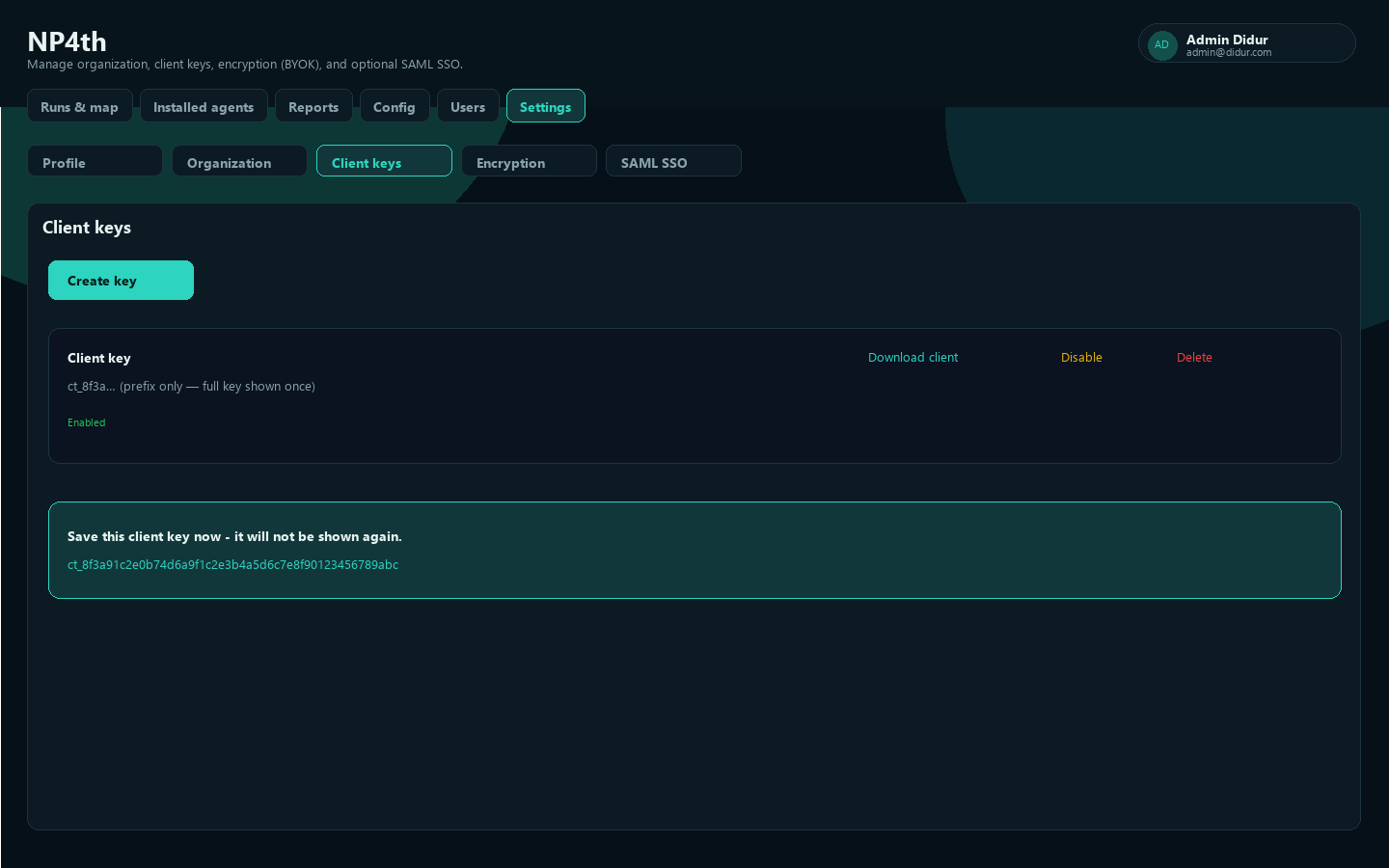
Create a key
- Open Settings → Agent keys.
- Choose Create key (prompt default name:
Agent key). - Copy the raw value immediately. Format:
ct_plus 48 hex characters. - Store it in your secret manager. NP4th will not show the full key again.
Anyone with a live key can register agents and upload runs for your tenant. Treat keys like passwords.
One-time reveal
After creation you see: Save this agent key now - it will not be shown again. If you lose it, create a new key and rotate endpoints; you cannot recover the old plaintext.
Download / bake into installer
Download agent builds a ZIP named like NP4th-{slug}-{keyPrefix}.zip containing:
- Prefilled
client-config.json(apiBaseUrl,tenantSlug,clientKey) Install-NP4th.cmdNP4thSetup-<version>.exewhen available on the server
Extract the ZIP, then run Install-NP4th.cmd from the extracted folder. Download is blocked for disabled keys.
Silent form used by the script:
NP4thSetup-<version>.exe /SILENT "/TENANT={slug}" "/KEY={key}" "/URL={apiBaseUrl}"For Group Policy / msiexec, use the MSI from the same client build artifacts when published:
msiexec /i NP4th-<version>.msi /qn TENANT={slug} KEY={key} URL={apiBaseUrl}See Getting started - Windows for GPO and MST notes. The baked ZIP still ships the EXE Setup by default.
Disable, enable, delete
| Action | Effect |
|---|---|
| Disable | Agents using the key stop uploading until you enable it again |
| Enable | Restores a disabled key |
| Delete | Permanently removes a disabled key only |
Confirm prompts explain that disabled agents stop uploading and that delete is permanent.
Rotation
- Create a new key and bake a new installer (or update
client-config.jsonon endpoints). - Deploy the new key to agents.
- Confirm new heartbeats/runs under Installed agents.
- Disable the old key, wait until the fleet is migrated, then Delete.
Keep at least one valid key while rotating so scheduled probes do not go silent mid-rollout.